Chart numberformat space bug
2019-06-28 Charts 0 108
Are you using a space char as the thousandsseparator in numberformats, like "# ##0", "# ##0.00", "# ##0 " or "# ##0.0 "?
You have probably noticed that ticklabels and datalabels in a chart sometimes show your numbers with an incorrect numberformat.
The numbers will be displayed correct if you replace the space in the numberformat for the ticklabels and datalabels with Chr(160) (nobreakspace).
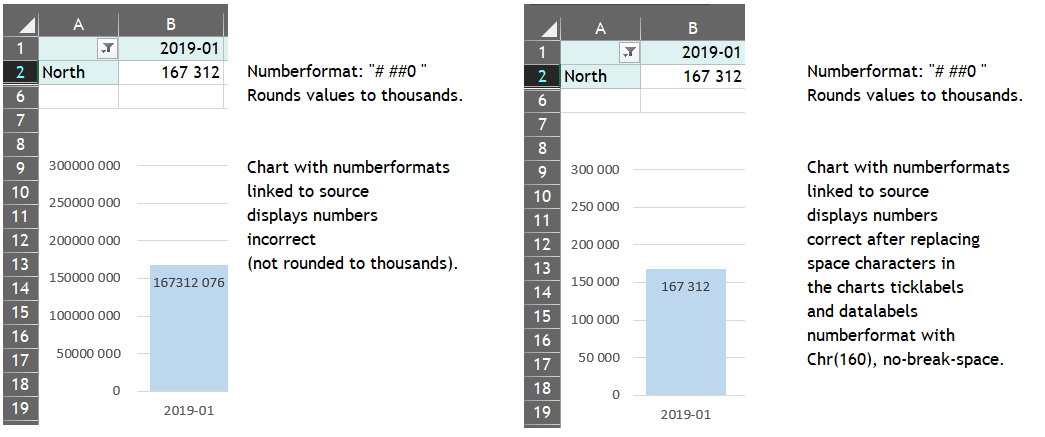
The macros below can be used to update all charts in a workbook and replace the space char with a nobreakspace char in ticklabels and datalabels numberformats that has a space character as the thousandsseparator:
Sub Charts_FixThousandsSeparatorBug(Optional wb As Workbook = Nothing)
' updated 2019-06-28 by OPE
' fixes bug regarding numberformats using space as thousandsseparator (converts space to nobreakspace)
' example: Charts_FixThousandsSeparatorBug ActiveWorkbook
Dim strTS As String, ws As Worksheet, objCO As ChartObject, objChart As Chart
    If Application.UseSystemSeparators Then
        strTS = Application.International(xlThousandsSeparator)
    Else
        strTS = Application.ThousandsSeparator
    End If
    If strTS <> " " Then Exit Sub ' no bug to fix

    If wb Is Nothing Then
        On Error Resume Next
        Set wb = ActiveWorkbook
        On Error GoTo 0
        If wb Is Nothing Then Exit Sub
    End If

    For Each ws In wb.Worksheets
        For Each objCO In ws.ChartObjects
            Chart_FixThousandsSeparatorBug objCO.Chart, strTS
        Next objCO
    Next ws
    For Each objChart In wb.Charts
        Chart_FixThousandsSeparatorBug objChart, strTS
    Next objChart
End Sub

Sub Chart_FixThousandsSeparatorBug(objChart As Chart, Optional strTS As String = vbNullString)
' updated 2019-06-28 by OPE
' fixes bug regarding numberformats using space as thousandsseparator (converts space to nobreakspace)
' example: Chart_FixThousandsSeparatorBug ActiveSheet.ChartObjects(1).Chart
Dim i As Long, j As Long, varAxis As Variant, varIndex As Variant
    If objChart Is Nothing Then Exit Sub

    If Len(strTS) = 0 Then
        If Application.UseSystemSeparators Then
            strTS = Application.International(xlThousandsSeparator)
        Else
            strTS = Application.ThousandsSeparator
        End If
    End If
    If strTS <> " " Then Exit Sub ' no bug to fix

    varAxis = Array(xlValue, xlCategory)
    varIndex = Array(xlPrimary, xlSecondary)
    With objChart
        ' update numberformat for the chart axis tickmark labels
        For i = LBound(varAxis) To UBound(varAxis)
            For j = LBound(varIndex) To UBound(varIndex)
                If .HasAxis(varAxis(i), varIndex(j)) Then
                    With .Axes(varAxis(i), varIndex(j)).TickLabels
                        If InStr(1, .NumberFormat, "# #", vbTextCompare) > 0 Then
                            .NumberFormat = Replace(.NumberFormat, " ", Chr(160)) ' fixes bug but unlinks the numberformat
                        End If
                    End With
                End If
            Next j
        Next i

        ' update numberformat for the chart series data labels
        For i = 1 To .FullSeriesCollection.Count
            With .FullSeriesCollection(i)
                If .HasDataLabels Then
                    For j = 1 To .Points.Count
                        With .Points(j).DataLabel
                            If InStr(1, .NumberFormat, "# #", vbTextCompare) > 0 Then
                                .NumberFormat = Replace(.NumberFormat, " ", Chr(160)) ' fixes bug but unlinks the numberformat
                            End If
                        End With
                    Next j
                End If
            End With
        Next i
    End With
End Sub