Display a progressbar on the statusbar
2016-09-25 Application 0 407
If you want to show how your macro is progressing in a little more "graphic" way, you can use the procedure below.
To avoid updating the statusbar too often and slow your macro down, you can set a limit too how often you want the statusbar to be updated. The default is currently set to every 2 seconds.
Sub ShowProgress(strText As String, dblPercentDone As Double, Optional blnDoEvents As Boolean = False, Optional lngRefreshInterval As Long = 2)
' updated 2016-10-05 by OPE
' displays a progress bar on the Statusbar
' lngRefreshInterval: expects a value between 0 and 15 (seconds)
Const clngBarSize As Long = 20
Dim PROG_CHAR As String, BAR_CHAR As String, lngProgress As Long
Static dblLastTime As Double ' remembers the last time this procedure was run
    If dblPercentDone < 0 Or dblPercentDone > 1 Then Exit Sub

    If lngRefreshInterval < 0 Or lngRefreshInterval > 15 Then lngRefreshInterval = 2 ' seconds
    If Abs(Timer - dblLastTime) < lngRefreshInterval Then Exit Sub ' less than lngRefreshInterval seconds since last statusbar refresh

    If Val(Application.Version) > 14 Then ' Excel 2013 or later
        BAR_CHAR = ChrW(&H2610) ' empty square
        PROG_CHAR = ChrW(&H25A0) ' solid square
    Else ' Excel 2010 or earlier
        BAR_CHAR = Chr(149) ' dots
        PROG_CHAR = Chr(135) ' hash
    End If

    lngProgress = CLng(dblPercentDone * clngBarSize)
    On Error Resume Next ' will fail if the text is too long
    Application.StatusBar = Left(Replace(Space(lngProgress), " ", PROG_CHAR) & Replace(Space(clngBarSize - lngProgress), " ", BAR_CHAR) & " " & Format(dblPercentDone, "0 %") & " " & strText, 255)
    On Error GoTo 0
    dblLastTime = Timer
    If blnDoEvents Then DoEvents
End Sub

Sub TestShowProgress()
Dim i As Long, t As Long
    t = 10
    For i = 1 To t
        ShowProgress "Your own status bar text", i / t
        Application.Wait Now + TimeValue("00:00:01") ' do something
    Next i
    Application.StatusBar = False ' reset the status bar
End Sub
In Excel 2013 or later something like this will be displayed on the StatusBar: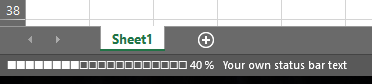
In Excel versions before 2013 something like this will be displayed on the StatusBar:
